;)

In the previous parts of this series, we explored the evolution of Microsoft’s user lifecycle solutions and the current capabilities of Microsoft Entra. In this post, we show how Quisitive’s User Lifecycle builds on those solutions to solve specific challenges and strengthen identity management.
The goal of Quisitive’s User Lifecycle is not to compete with Microsoft’s User Lifecycle, but to add more capabilities to or (or dare I say to complete versus compete).
Terminology Mapping & Definitions
Organizations often use different terms for the same concept. For example, Microsoft uses Joiner, Mover, and Leaver. In contrast, Quisitive uses Onboard, Change, and Offboard. Customers sometimes prefer other terms like Hires/Updates/Terms or Provisioning/Deprovisioning. Others even use custom names such as “New Employee Request Form” (NERF).
Here’s the mapping between Microsoft’s terms and Quisitive’s:
- Joiner = Onboard
- Mover = Change
- Leaver = Offboard
Other relevant terms include:
- SCIM: System for Cross-Domain Identity Management
- SSO: Single Sign-On (Microsoft Single Sign-On for the purposes of this blog post)
Custom Integrations for Non-SCIM and Non-SSO Applications
Quisitive’s User Lifecycle excels at integrating with applications that don’t support SCIM or SSO. This capability is critical for organizations that depend on legacy or specialised systems. With custom connectors, identity management stays consistent across all platforms.
The User Lifecycle team has built integrations through PowerShell, APIs, databases, and even Selenium (web browser automation). The solution includes more than 600 pre-built modules and 50+ connectors. These modules combine into workflows customized to each organization’s requirements.
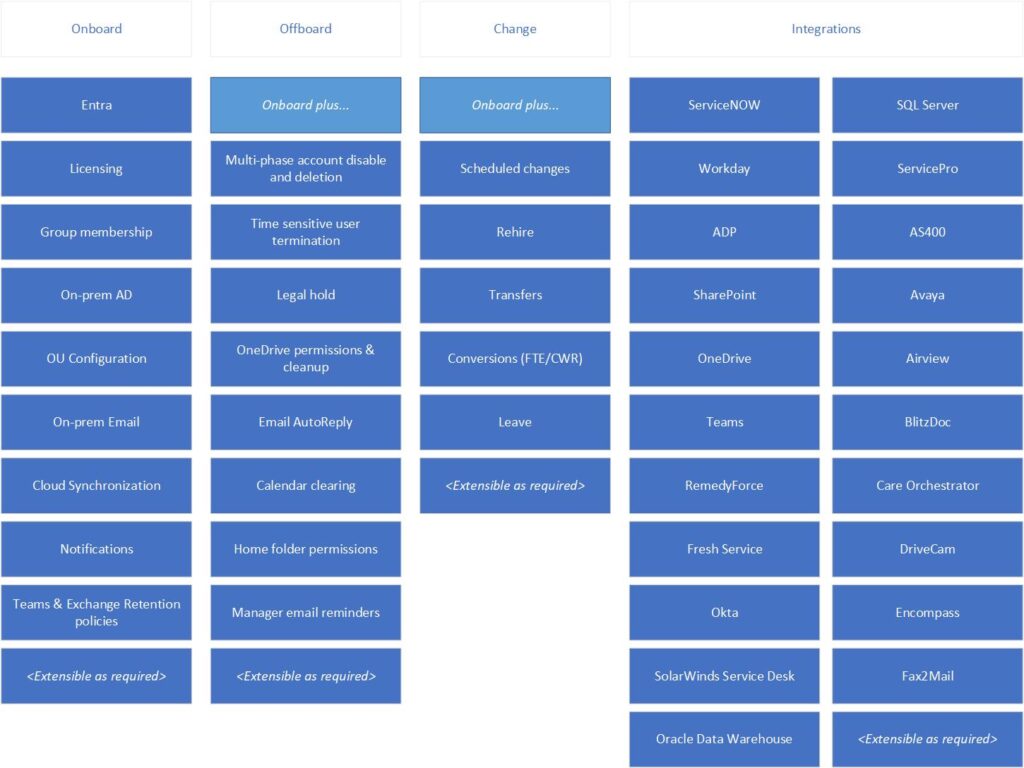
The relevant modules are combined into a workflow which is customized to the organization’s requirements (an example is shown below):
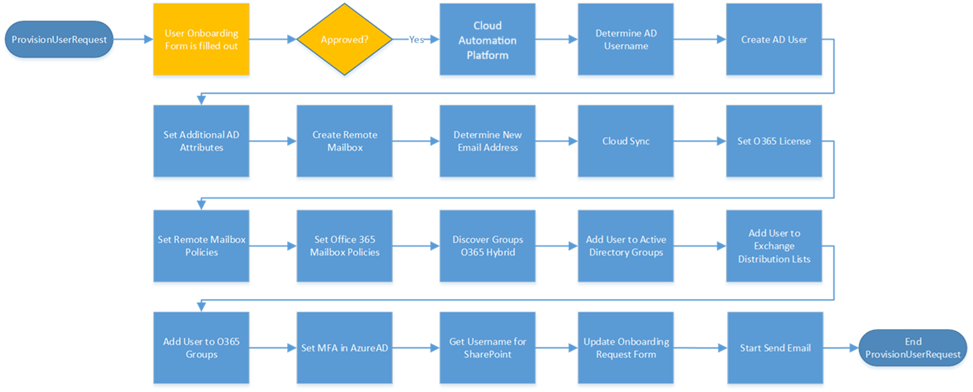
Role-Based Access Matrix
Effective identity management goes beyond provisioning and deprovisioning accounts; it involves enforcing consistent role-based access across diverse environments. Quisitive’s User Lifecycle solution includes a robust role-based access matrix that helps organizations define and manage access rights based on user roles. This ensures that users have the appropriate access to resources, enhancing security and compliance.
The Quisitive team uses existing automations to assess your existing environment to determine an initial role-based access matrix. Once this assessment has been completed, Quisitive can leverage your organization’s preferred source of record to store this information (this is commonly stored in either SharePoint Online or in a SQL database). The matrix is co-maintained by Quisitive and the customer to allow changes that occur over time such as adding a new job title to the organization.
The screenshots below show examples of how access can be defined across multiple options including business units and cost centers.


Managed, Maintained and Enhanced by Quisitive
Automation by its nature needs to change over time as organizations change. Quisitive has taken this to heart by providing User Lifecycle as a service instead of a product. Quisitive works with your team to make sure that the User Lifecycle solution is working as you need it to be, and changing as your organization changes. Common examples of this include changes to an HRIS system, ticketing system, or integration with a non-SCIM or non-SSO capable application. After the initial implementation of the solution has occurred, the customer level of involvement can be decreased to a weekly half an hour team meeting to prioritize enhancements or development of new features.
Quisitive’s solution is quick to implement (what we call “fast to functional”), cost effective (approximately 30% less than other major product offerings in this space), and grows and changes with your organization.
Immutable Logging via Log Analytics
Security and compliance demand transparency. User Lifecycle uses immutable logging through Log Analytics to record identity activities. These tamper-proof logs help organisations monitor actions, detect anomalies, and meet compliance requirements.
Ticket System Integration
Integrating identity management with IT service management systems is essential for streamlining user provisioning and support processes. Quisitive’s User Lifecycle integrates with popular ticket systems, enabling automated user provisioning, updates, and deactivation based on ticket status. This reduces administrative overhead and ensures that user access is always up-to-date.
HR System Integration Connectors and Writeback
Quisitive’s User Lifecycle offers connectors for integrating with HR systems that do not have native SCIM support, such as Workday or SuccessFactors. These connectors facilitate user provisioning and deprovisioning, ensuring that user information is consistent across all systems. Additionally, writeback functionality can synchronize changes made in Microsoft Entra ID back to the HR system, maintaining data integrity.
Lifecycle Workflows and Entra Suite Licensing
Quisitive’s User Lifecycle can leverage the Entra suite licensing from Microsoft and enhance what Microsoft has made available within that licensing model including HR-driven provisioning (available in Entra ID P1 and above) and the Lifecycle workflows added with Microsoft Entra Suite.
Additionally, organizations can extend their HR-driven processes with Quisitive’s Lifecycle Workflows, even without additional Governance or Suite licensing. These workflows automate tasks such as sending temporary passwords, assigning group memberships, and automating access package assignments.
Each of these approaches enhance efficiency and ensures that users have the right access at the right time.
Quisitive’s Cloud Automation Platform
At the heart of Quisitive’s User Lifecycle solution is the Cloud Automation Platform. This platform provides a comprehensive suite of tools and capabilities for automating identity management processes – both in the cloud and on-prem. From custom integrations to lifecycle workflows, the Cloud Automation Platform ensures that organizations can manage user identities efficiently and securely. Quisitive’s Cloud Automation platform is currently processing over half a million automations a year for our customers.
Reporting
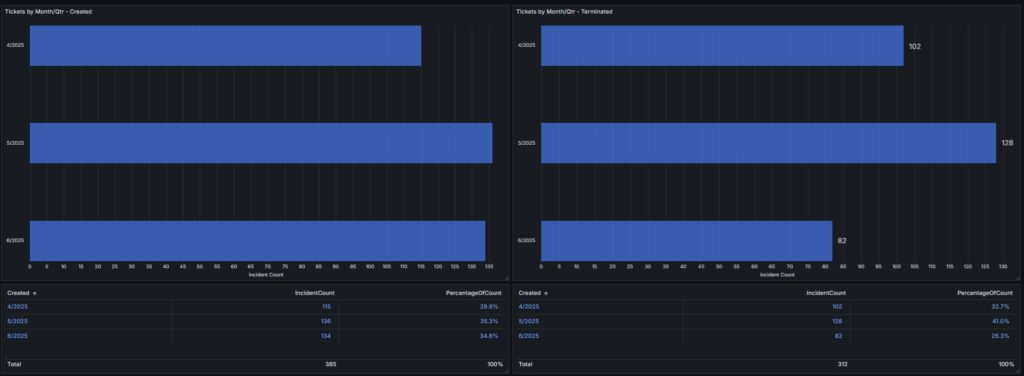
Quisitive provides reports customized based upon what your organization needs. An example of this is shown below that showcases the number of automations occurring in your organization, and their success rates.
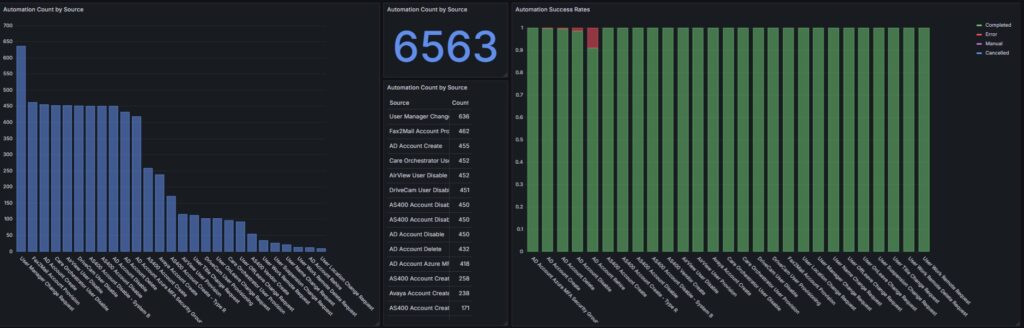
Reports can be customized to your requirements as shown in the example below that provides a total number of automations per quarter.
Example Use Cases
Here are some example use cases of combining Microsoft and Quisitive User Lifecycles.
User Onboard
When Maya accepted her new role, she expected the usual onboarding delays—waiting for accounts, chasing down access, and filling out redundant forms. But the moment her offer letter was signed, Quisitive’s User Lifecycle sprang into action. Behind the scenes, the Cloud Automation Platform integrated with the company’s HR system, triggering a cascade of automations: her Microsoft Entra ID was provisioned as well as her on-prem Active Directory credentials, temporary credentials were sent, and she was instantly added to the right Teams channels, SharePoint sites, and access groups—all without a single manual task from the IT department, and with a corresponding ticket in the ticketing system for the work that was completed.
By the time Maya walked in on her first day, her laptop was ready, her calendar was populated, and her inbox held a welcome message from her manager. She was already collaborating with her team, thanks to pre-assigned access packages and role-based permissions. What took days now happened in minutes—securely, seamlessly, and with full auditability. For Maya, it felt like magic. For the company, it was just another day powered by Quisitive.
User Change
Change is constant, especially when it comes to users and their access to systems. When Kaitlyn was promoted, it came with a change of departments and a move to another part of the organization. When Kaitlyn got married several things changed including her last name, and a relocation to a new city. Kaitlyn had her first child and took a brief leave of absence before returning to the company full time. Kaitlyn’s contributions were highly valued by the organization, and upon her retirement, she transitioned into a contractor role. This arrangement enabled her to continue providing expertise on an as-needed basis, aligned with both the company’s requirements and her availability.
As each of the steps of Kaitlyn’s career occurred, the Cloud Automation Platform was there to make these required changes behind the scenes seamlessly allowing Kaitlyn to focus on what is important – doing her job to the best of her ability.
User offboard
When Jordan submitted their resignation, the company’s systems didn’t flinch. User Lifecycle had already synced with the HR platform, and the termination date triggered a cascade of automated actions. At precisely 8 PM Central, the Cloud Automation Platform initiated the offboarding sequence: Jordan’s Active Directory profile was disabled, licenses were revoked, and their mailbox was converted and delegated to their manager. Simultaneously, access to VPN, SharePoint, and third-party apps like Keeper and Expensify was rescinded—no manual tasks were required from the helpdesk and no delays.
By the next morning, Jordan’s manager had received a secure email with links to Jordan’s OneDrive and Outlook data. Devices were marked for return, and any lingering sessions were forcibly closed. Even niche systems like Kantata and additional Azure tenant profiles were deactivated. Jordan’s user account was marked for deletion in 90 days to finish removal of accounts and resources. What once took days of manual coordination now happened in minutes, with full auditability and zero security gaps. For IT, it was seamless. For the business, it was peace of mind.
Bulk provisioning (store provisioning)
When the retail chain approved its newest store location, the operations team didn’t scramble—they submitted a single request through their ticketing system. That request triggered Quisitive’s Cloud Automation Platform (CAP), which orchestrated the entire provisioning process.
Within minutes, the new store’s Active Directory structure was created, Microsoft 365 licenses were assigned, and role-based access was granted to the store manager and staff. Even third-party systems like point-of-sale, payroll, and inventory were automatically configured based on the pre-built role-based access matrix.
As the store’s opening day approached, everything was already in place: Wi-Fi credentials were distributed, shared mailboxes were live, and Teams channels were pre-populated with onboarding materials. Immutable logging via Log Analytics ensured every action was tracked for compliance, and the automation’s status was written back to the original ticket for full visibility. What used to take weeks of coordination now happened in hours—secure, scalable, and repeatable. For the customer, it wasn’t just a new store—it was a new standard.
Futures
Quisitive’s User Lifecycle team is excited about the future to see how we can further integrate AI, integration with other cloud providers, and to provide automated Exchange Retention policy and Litigation hold assignments, all while continuing to add new functionality across our existing customer base.
Summary
Quisitive’s User Lifecycle solution augments Microsoft’s identity management capabilities, addressing specific challenges and enhancing overall efficiency. By providing custom integrations, role-based access management, immutable logging, ticket system integration, HR system connectors, reporting, lifecycle workflows all as part of a solution managed by Quisitive so your organization does not have to. Quisitive ensures that organizations can manage user identities seamlessly and transparently across your organization.
Check out the other blogs in this series: