;)

Cyber attackers are increasingly targeting user identities and cloud applications – not just PCs. In the modern threat landscape, stolen passwords and cloud account breaches have become prime entry points for cyberattacks12. Traditional endpoint security (like antivirus on laptops) is no longer enough when attackers can directly compromise your Microsoft 365 (Office 365) accounts, cloud email, or identity provider. This report explains how to understand these identity- and cloud-focused risks, implement strong preventive measures (with an emphasis on Microsoft Office 365 Security, Defender, Entra, and Azure tools), and prepare an effective response plan. The goal is to help both technical and non-technical readers fortify their defenses against cyber attacks beyond the traditional endpoint.
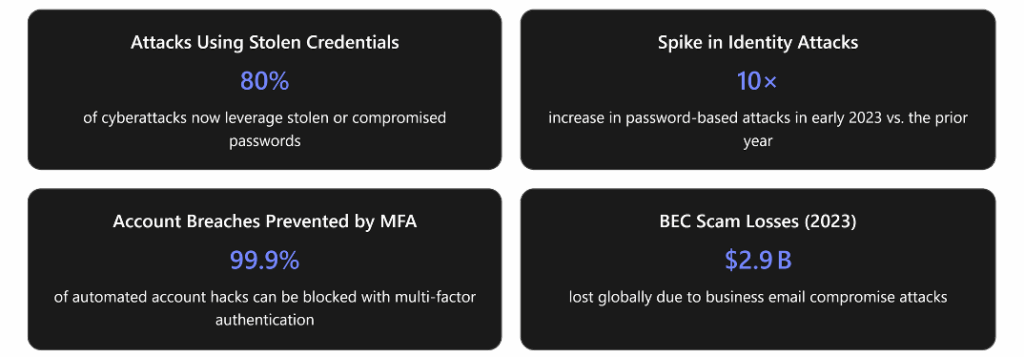
These numbers underscore why identity protection and cloud security are now front and center in cybersecurity. Below, we break down the evolving threats and how you can protect your organization, step by step.
The Changing Threat Landscape: Identity and Cloud Attacks
Cybercriminals are shifting their tactics toward identities and cloud services. One set of valid login credentials can give an adversary everything needed to access a business’s cloud environment, move between services, escalate privileges, steal data, or even sabotage systems1. Instead of fighting through firewalls or planting malware, attackers often simply log in with someone’s username and password – a strategy that bypasses many traditional defenses1. In fact, over 80% of breaches now involve lost or stolen credentials or other identity compromises1. These identity-focused attacks are often stealthy (sometimes called “malware-free” attacks) because the hacker is using legitimate login methods, making them harder to detect with legacy security tools1.
At the same time, organizations’ increasing use of cloud applications (such as Microsoft 365’s email, file storage, and collaboration tools) has given attackers new targets beyond on-premises networks. Cloud application attacks include things like compromising a software-as-a-service (SaaS) account, abusing misconfigured cloud settings, or tricking users into authorizing malicious apps. Because these attacks occur in the cloud, they may not involve any infection on a user’s device – meaning traditional endpoint security might not catch them.
Some common identity and cloud attack scenarios include:
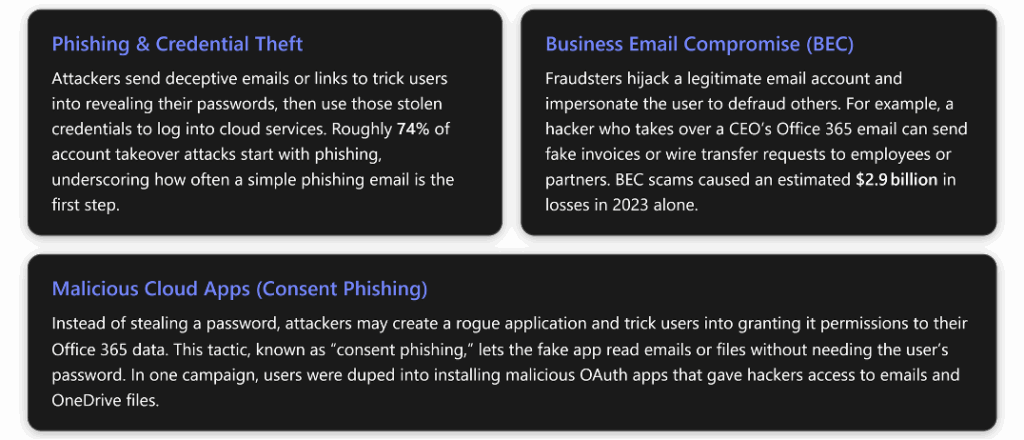
The impact of these attacks can be severe: unauthorized access to sensitive data, financial theft (as in BEC cases), downtime, reputational damage, and costly regulatory consequences. Importantly, these incidents often occur without any malware ever touching an employee’s computer. For instance, if an attacker logs in to your cloud email account from abroad using your stolen password, they can quietly forward or download confidential emails3, and no antivirus will flag it – because from the system’s perspective, a valid user just accessed their mailbox.
Case Study: A Recent Office 365 Breach Example
To illustrate how identity-centric attacks unfold, let’s look at a real-world Office 365 breach scenario. In 2023, even Microsoft itself fell victim to a sophisticated identity/cloud attack, demonstrating that no target is immune. Here’s a simplified timeline of what happened in that incident:
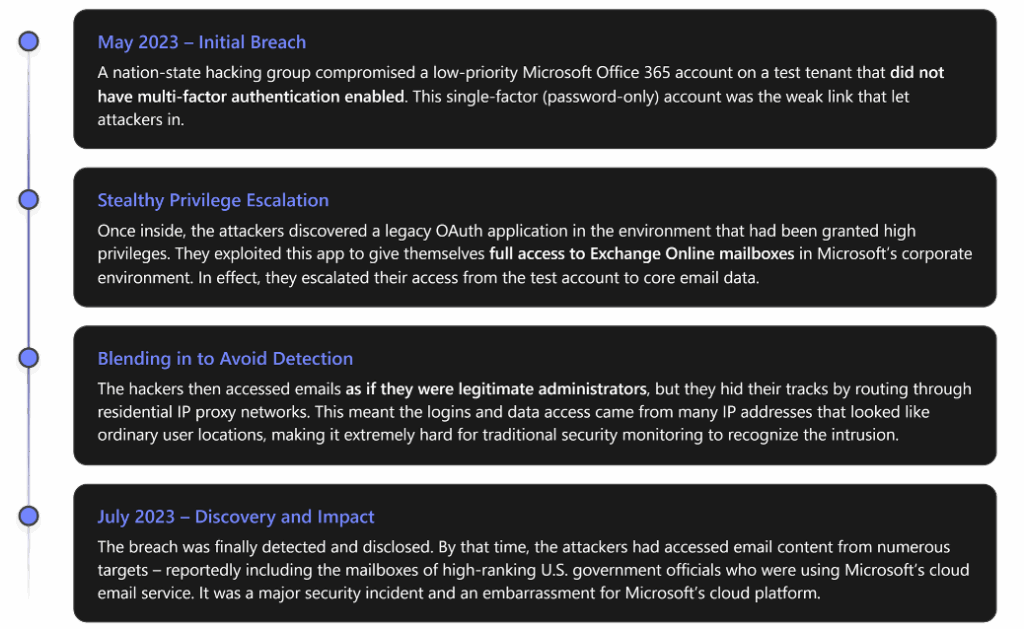
Key lessons from this example: A single unprotected account (missing MFA) can compromise an entire cloud tenant, and attacks on identities can escalate in unexpected ways (abusing a trusted app in this case). Additionally, when attackers use valid credentials and standard protocols, their activity may not trigger obvious alarms. This is why layered defenses and vigilant monitoring are crucial – topics we turn to next. Had strong authentication and anomaly detection been in place, the breach might have been prevented or spotted far sooner4.
Strengthening Your Defenses: Prevention Strategies
Preventing cyber attacks is far preferable to reacting after the fact. By taking proactive steps to secure identities and cloud apps, you can dramatically reduce the likelihood of a breach. Microsoft’s security experts have observed that organizations with robust identity security are far less likely to suffer successful attacks5. Below are the most important prevention best practices to implement (focused on Microsoft 365 and Azure tools, though the principles apply broadly):
- Enable Multi-Factor Authentication (MFA) Everywhere – Require a second form of verification for all logins. This single step is one of the most effective security measures you can take. Microsoft reports that enabling MFA can block over 99.9% of automated account attacks5. Even if an attacker steals or guesses someone’s password, they won’t be able to access the account without that second factor (like a one-time code on the user’s phone).
Make sure all users and especially administrators have MFA enforced6. Had MFA been enabled on the test account in the case study, the attackers would have been stopped at the first step4. There are user-friendly options available (mobile authenticator apps, hardware security keys, etc.), and even basic SMS-based MFA is far better than nothing. In short, MFA is essential for any cloud service – not just Office 365, but any account that supports it. - Adopt Strong Identity Management (“Zero Trust” and Least Privilege) – Don’t inherently trust any login – always verify, and minimize access rights. Embracing a Zero Trust approach means every access request is treated as untrusted until confirmed. In practical terms, use tools like Conditional Access policies in Microsoft Entra ID (Azure Active Directory) to enforce conditions for login, such as requiring MFA if a login is from a new location or blocking logins from risky countries by default7. Conditional Access can ensure that even if a password is stolen, the login still needs to meet certain checks or it gets blocked.
Additionally, implement least privilege access: every user (and admin) should have only the minimum permissions necessary for their role6. For example, don’t use a global administrator account for daily work – use a normal user account and separate admin accounts, and utilize role-based access control (RBAC) to limit what each admin can do6.
Microsoft Entra ID has features like Privileged Identity Management (PIM) to elevate admin rights just-in-time when needed, reducing standing high privileges. By limiting access in this way, you contain the damage if any single account is compromised. - Secure Your Cloud Applications and Data – Leverage built-in cloud security features and tighten configurations. Make sure you are using the security capabilities provided by your cloud services:
A. Email and Document Protection: Office 365 (Microsoft 365) includes advanced threat protection features – use them. For instance, Microsoft Defender for Office 365 can scan email attachments and links for malware or phishing, helping to stop threats before they reach users. This is critical since email is the #1 entry vector (35% of malware is delivered via email2). Ensure features like Safe Links/Safe Attachments in email are turned on to automatically neutralize malicious content. Also consider using Data Loss Prevention (DLP) policies and sensitivity labels (available in Microsoft 365) to safeguard sensitive information in emails and files.
B. Cloud App Monitoring: Deploy a Cloud Access Security Broker (CASB) solution such as Microsoft Defender for Cloud Apps to monitor usage of cloud services. This tool can detect unusual cloud activities (for example, a user downloading an unusually large amount of data from SharePoint, or logging in from two countries in an hour) and raise alerts1. CASBs also enable you to set policies – for instance, blocking access to Office 365 from unmanaged devices or untrusted apps4. Microsoft’s security platform integrates signals across Defender for Office 365, Defender for Cloud Apps, and Azure AD, so enabling these creates a unified defense system8.
C. Lock Down Third-Party App Access: Attackers may try to exploit your cloud by getting users to install rogue third-party applications (as in consent phishing). To counter this, carefully control app permissions. In Azure AD (Entra), you can block users from consenting to new OAuth apps or require an administrator to vet and approve any app that asks for wide-ranging permissions6. By blocking blanket user consent to apps6, you ensure that only trusted, reviewed applications can access your organization’s Office 365 data, closing the door on malicious apps3.
D. Up-to-Date Cloud Configurations: Regularly review your cloud tenant’s security settings and keep them updated. Services like Microsoft 365 are constantly adding security improvements, but often they need to be configured or enabled. Microsoft provides a “Security Defaults” baseline that, if enabled, automatically enforces some best practices (MFA, blocking legacy authentication protocols, etc.) on newer tenants6. If you haven’t already, consider enabling those or at least manually configuring equivalent policies. Also disable any legacy or less-secure protocols that attackers might abuse (for example, legacy email protocols that don’t support MFA)6. Keep your tenant’s security posture reviewed against Microsoft’s recommendations (the Secure Score tool in the 365 admin center can be helpful for this). - Enable Vigilant Monitoring and Alerts – Detect incidents early by watching for warning signs. Even with strong preventive measures, you want a safety net in case something slips through. Set up audit logging and alerting in your cloud environment so that unusual activities don’t go unnoticed6. In Office 365, enable the Unified Audit Log (if it’s not already on) to record events across Exchange, SharePoint, Teams, Azure AD, etc.6.
This consolidated logging is invaluable for incident investigation and can feed into alerting systems. For example, you can configure security alerts for things like multiple failed login attempts, impossible travel logins (the same user ID logging from two far-apart locations in short succession), mass file deletions, or new admin role assignments.
Microsoft Sentinel (a cloud SIEM on Azure) or third-party security monitoring services can ingest these logs and use analytics to flag anomalies. Many breaches, like the one in our case study, go on for months undetected if logs aren’t monitored – industry data shows an average of around 243 days to detect an identity breach without proper tools1.
By actively monitoring, you aim to spot and stop suspicious activity early before it escalates. As Microsoft’s incident responders advise: ensure you’re logging the right things (such as mailbox access events) and that someone is reviewing those logs or alerts7. Early detection can turn a potential major breach into a minor contained incident. - Educate and Train Your Users – Cultivate a human firewall. Technology alone is not enough – users play a critical role in prevention. Regularly train employees to recognize phishing emails, social engineering tricks, and other scams that target credentials3.
Non-technical users should understand that a message asking them to “reset their Office 365 password” or a surprise file share request could be malicious. Conduct phishing simulation exercises to keep people alert, and teach them simple habits like hovering over links to check URLs, or independently verifying unusual requests (e.g., calling a colleague to confirm that an odd email asking for money is real).
Many attacks (phishing, BEC, etc.) explicitly exploit human trust. Consistent security awareness training can significantly reduce the chance that an employee falls for a scam, thereby stopping the attack at step one.
The 2019 breach at Veolia, for example, was caused by a successful phishing email – something better user awareness and skepticism could have prevented3. Empower your people to be skeptical and report suspicious messages. Encourage a culture where it’s OK to double-check requests and involve IT if something seems off. In addition, make sure everyone knows basic incident reporting procedures (whom to call if they suspect their account is compromised, etc.). Well-trained users are truly the last line of defense and often the first to notice when something phishy is going on.
By implementing these preventive measures, you will have a robust shield against the most common identity and cloud attack vectors. Microsoft’s own incident analysis emphasizes combining multiple layers – strong authentication, privileged access controls, threat detection, and user awareness – to harden your environment against even advanced threats94. Next, we address the other side of the coin: how to respond quickly and effectively if an attack does occur.
Incident Response: Be Ready to React Swiftly
Even with excellent defenses, no system is 100% infallible. Companies like Microsoft and Okta (identity providers themselves) have suffered breaches, underscoring that determined attackers can sometimes find a way in7. That’s why preparing for incident response is critical. A fast, organized response can dramatically limit the damage of a cyber attack. In contrast, poor response planning leads to confusion, delays, and a worse outcome (unfortunately, many traditional incident response plans don’t account for the nuances of cloud environments and can falter when an identity breach occurs9).
Every organization should have a documented and practiced Incident Response Plan. This plan outlines what to do and who to contact when you suspect a breach. Below are the key phases of responding to a cyber attack, espcially one involving cloud accounts, along with what actions to take in each phase:

In all these stages, communication is key. Make sure your team knows their roles – for instance, who contacts your cloud provider or external incident response consultants, who communicates with management and possibly customers, and so on. Having a clear plan and practiced routine will reduce chaos if an attack happens. Time is of the essence during incidents, so preparation pays off in faster mitigation.
One more aspect of response in cloud-centric attacks: involve your providers as necessary. If your Office 365 tenant is compromised, don’t hesitate to reach out to Microsoft support or Microsoft’s Incident Response team for assistance; they can provide specialized guidance and help analyze logs or provide tools (especially if it’s a severe incident). The same goes for any other major cloud service provider. They have a vested interest in helping you resolve security issues on their platform.
By planning and drilling your response, you transform cyber attacks from existential disasters into manageable IT problems. As the saying goes, hope for the best but prepare for the worst. Preparation and practice ensure that even if attackers get past your front-line defenses, you can rapidly neutralize the threat and recover.
Conclusion and Key Takeaways
Cyber attacks targeting identities and cloud services are a reality of doing business in a connected world. However, by understanding these threats and implementing the right mix of preventive and responsive strategies, you can greatly reduce your risk. It’s all about taking proactive steps now to avoid pain later. Let’s recap the essential takeaways for preparing for and responding to cyber attacks in the era of cloud and identity:

In summary, defending against cyber attacks today means broadening our focus beyond the endpoint. We must secure identities, cloud apps, and data with the same diligence traditionally applied to networks and devices. Microsoft’s suite of security tools – from Office 365’s built-in protections, to the Defender range, to Azure and Entra ID capabilities – provides a strong arsenal to build this defense when configured and used properly. Combine those tools with smart policies and informed people, and you will significantly harden your organization against even advanced threats.
Finally, remember that cybersecurity is an ongoing journey, not a one-time checklist. Stay updated on the latest threats and continuously improve your stance. The tactics of attackers evolve, but a mindset of vigilance, preparation, and rapid response will ensure that you can adapt and keep your organization safe. With the right preparation in prevention and response, a cyber attack becomes something you are ready for – and able to handle – rather than a helpless inevitability.