;)

In today’s fast-paced development landscape, organizations are expected to innovate faster, streamline their operations, and integrate with anything, all while cutting costs. This creates the need for organizations to automate even more of their existing business processes, requiring involvement from all levels of the organization, from the business process owners down to the end users, and everyone in between. For organizations to deliver the smart and reliable solutions needed for success, everyone needs to be empowered to get things done.
Microsoft’s Power Platform has emerged as a key ingredient for this empowerment—democratizing automation through its suite of low-code tools.
What Does “Democratizing Automation” Really Mean?
At its foundation, democratization of automation makes powerful technology accessible to everyone, not just professional developers. By leveraging the Power Platform, business users can now automate processes, build apps, and analyze data with minimal coding experience. These new citizen developers enable organizations to tap into the creativity and problem-solving capabilities of their entire workforce.
What is Microsoft’s Power Platform?
Microsoft’s Power Platform is a suite of tools and services that, when used together, form a cohesive ecosystem that supports end-to-end business process automation.
It is comprised of three main components:

Power Automate
Microsoft’s cloud-based service enables users to streamline repetitive tasks and integrate systems through automated workflows. These “flows” can exist as stand-alone processes, as extra logic within connected applications, or as both, serving as the connective tissue of a business solution. They are “triggered” manually (by direct user interaction) or automatically (as a response to some external or system event or schedule), and integrate with custom and existing M365 data sources.

Power Apps
Microsoft’s low-code, rapid app development platform for mobile and web enables users to create applications tailored to specific business needs. These applications can integrate with custom and existing M365 data sources, along with other Power Platform services such as Power Automate flow and Power BI reports.

Power BI
Microsoft’s business analytics and data visualization tool enables users to build interactive reports and dashboards for sharing data-focused insights and making more informed data-driven decisions.
Democratized Automation in Action
Here at Quisitive, we’ve had the opportunity to solve countless real-world business problems. From implementing something as simple as sending a scheduled email to more complex scenarios such as connecting an organization’s numerous enterprise-wide 3rd party applications, data stores, and reporting tools, along with integrating them within their existing M365 products and secured Azure services backend.
Here are four real-world examples:
1. An organization needs a way to identify stale guest accounts to ensure its user governance policies are followed.
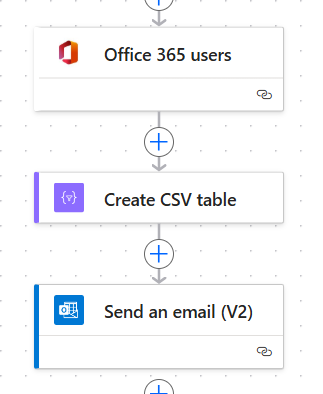
In its simplest form, this could be accomplished by building a scheduled Power Automate flow, composed of the following actions:
- Office 365 Users – Query for all guest users
- Create CSV Table – Build a CSV file of user
- Send an Email (V2) – Email the initiator an attached CSV file.
2. An organization has an existing application that needs to be enhanced to notify a specific department when the status of a request changes.
One way to accomplish this might be to integrate a Power Automate flow directly into the existing application or process by:
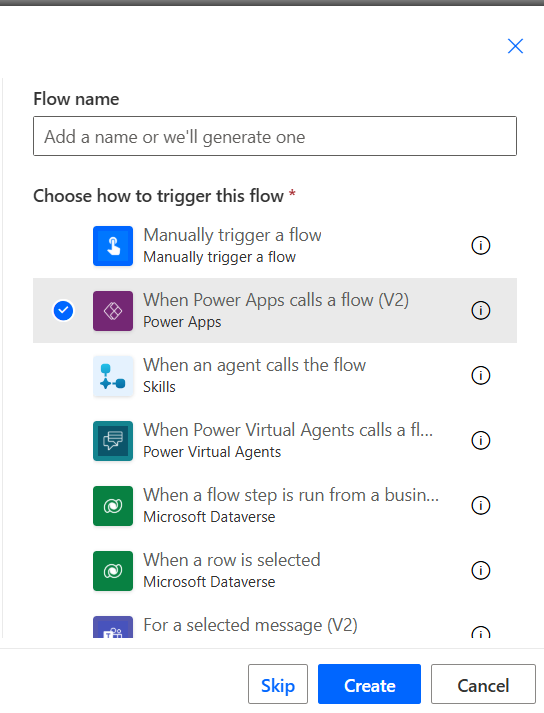
- Use an appropriate trigger to launch the flow:
(Inside App) Power App V2 trigger if the app is a PowerApp, or
(Inside App) HTTP trigger if app/code can be extended to call an API, or
(Outside App) Any data source event trigger, such as:- When an Item is Created (SharePoint), or
- When a row is added … (Dataverse),
- etc.
- Use the appropriate data source query action to get any additional details about the submitted request, such as:
- Get item (SharePoint), or
- Get a row by Id (Dataverse),
- etc.
- Use the O365 Groups action to call a MS Graph endpoint to fetch the appropriate distribution list for the pertinent department,
- Use the Send an Email (V2) action to email the appropriate department distro.
3. An organization has an existing Power BI report displaying data from SharePoint and wants to allow consumers of the report to view or update the SharePoint data directly from the report.
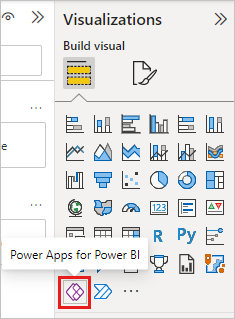
Power BI contains a native PowerApps visualization widget that can be used for this very scenario:
- Add the PowerApps visualization to the report,
- Configure the appropriate visualization fields,
- Launch the PowerApps Studio and create your PowerApp as you would for any other PowerApp, directly from the visualization widget, using the standard SharePoint connectors and controls.
4. An organization has an existing PowerApp plus several Azure Logic Apps and would like users to directly launch a Logic App when clicking a button in the PowerApp.
PowerApps has no direct visibility into Azure but does support using custom connectors and integration with Power Automate:
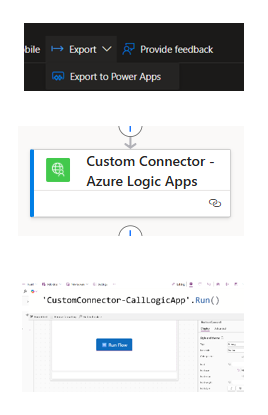
- Use the Azure Logic App’s native “Export to PowerApps” to create the custom connector.
- Add the Custom Connector directly to:
- The PowerApp, or
- A new or existing flow, then reference the flow inside the PowerApp,
Note: Custom Connector usage requires a Premium license
- Add a button to the appropriate screen and wire up the custom connector or flow calls.
These examples show just how powerful, flexible, and in some cases, easily integrated the tools and services are with one another within Power Platform. While the growth and maturity of the platform have increased and solidified, innovations and new technologies have spurred it to adopt some new tricks.
What’s New? AI-Powered Innovation
The integration of Copilot and generative AI into the Power Platform design tools provides users with the ability to use natural language to describe the solution they need—and the Power Platform itself will build it. This leap in usability further lowers the barrier to entry for users and accelerates solution development by literally automating their development process.

Why This Matters
- Faster Innovation: Solutions can be quickly prototyped and built, and near production-ready in days, not months.
- Cost Efficiency: Reduces the reliance on expensive custom development, in some cases.
- Inclusive Technology: Opens doors for non-technical users to contribute meaningfully to the conversation and solution, fostering greater collaboration amongst disparate teams.
- Proven ROI: The same tried and true platform, concepts, and development techniques are leveraged, resulting in solutions starting from a more stable foundation.
Conclusion
The Microsoft Power Platform is more than just a set of tools and services—it’s a movement toward inclusive, agile, and intelligent automation. By empowering every employee to become a creator, it transforms how organizations solve problems, make decisions, and deliver value.
Make sure to check out the other blogs in this series:
- Part 1: Automate Smarter: Microsoft Tools You Should be Using Right Now
- Part 2: Democratizing Automation with Microsoft’s Power Platform (This Article)
- Part 3: ARM & Bicep – Modern Infrastructure as Code for Azure
Coming Soon:
- Part 4: PowerShell
- Part 5: Azure functions
- Part 6: Azure Automation
- Part 7: Quisitive’s Cloud Automation Platform
- Part 8: Automation and Agentic AI